Use this buyer-focused guide to connect HubSpot, GoHighLevel, and Salesforce with a real workflow, measurable business value, and a better software decision.
Reader-first verdictNo paid ranking slotsPricing pressure checkedPlan limits, upgrades, and alternatives matterBuying pathClick only when the workflow fit is clear
Article verdict
Read this before you click a vendor offer.
Use this guide to turn CRM research into a cleaner software buying decision with fewer wasted vendor tabs.
By the end, you should know what to check, what to compare, and what would make this software decision worth the next click.
Affiliate disclosure: AppsAware may earn a commission from some vendor links. Rankings stay editorial, and the goal is still to help you choose the right tool, not the highest-paying one.
Primary questionUse this guide to turn CRM research into a cleaner software buying decision with fewer wasted vendor tabs.
A good software decision should make the next operational step obvious, not just add more tools to compare.
Best evidence3 related products mapped
Use product profiles, pricing guides, and comparison pages together before committing to a paid plan.
Next clickVisit HubSpot when it fits
The right click is the one that follows a clear fit, not the loudest vendor claim.
Research-backed buyer update
Official pages checked before this recommendation.
The article has been reframed around a practical buying path: identify the workflow, verify the current official offer, compare a close alternative, then click only when the fit is clear.
Decision pointWhat the research changesVerify before you click
Buyer intentThe page should help you decide what to buy, what to compare, or what to avoid, not just define a software category.Write down the workflow this tool must improve before opening vendor tabs.
Official offerHubSpot should be verified against its current official product or pricing page.Check pricing, limits, trial terms, support, and cancellation rules.
Next clickUse the HubSpot offer link only when the tool still fits after the checks above.Click only when the plan, workflow, and alternative are clear.
Buyer fit table
Which option deserves the next click?
ToolRolePrice checkBest forVerify before buyingAction
HubSpotPrimary productVerify livesales follow-up, agency pipelines, and customer managementConfirm current pricing, required features, support expectations, and whether the tool fits your workflow.Check HubSpot offer
GoHighLevelRelated option$97/mosales follow-up, agency pipelines, and customer managementConfirm current pricing, required features, support expectations, and whether the tool fits your workflow.Check GoHighLevel offer
SalesforceRelated optionVerify livesales follow-up, agency pipelines, and customer managementConfirm current pricing, required features, support expectations, and whether the tool fits your workflow.Read profile first
HubSpot directly matches the workflow you are trying to fix.
The plan you are considering still works after seats, contacts, usage, products, automations, or transaction limits.
Recent third-party review patterns do not show a deal-breaking support, billing, or reliability concern.
The closest alternative is either weaker for your use case or more expensive after real limits are included.
Skip or compare first
Red flags to catch early
You cannot explain the workflow this purchase will improve in one sentence.
The attractive entry price excludes the feature, contact tier, automation, or team access you actually need.
HubSpot only wins on brand familiarity, not on fit, price, or implementation effort.
You have not compared cancellation terms, data export, support expectations, and one serious alternative.
Buying checklist
Use this guide like a decision filter.
The goal is not to collect more software tabs. It is to narrow the choice until the next click feels obvious and defensible.
Write down the workflow you need solved before comparing CRM features.
Check the current plan limits, renewal terms, and upgrade trigger on the official site.
Compare HubSpot, GoHighLevel, and Salesforce against the same use case, not generic feature counts.
Look for recent user-review patterns around support, billing, reliability, and setup effort.
Open the official offer only when HubSpot still fits after those checks.
Final verification
Ask these before opening the vendor offer.
Which exact CRM workflow will HubSpot replace or improve?
Which plan unlocks the features you need today, not six months from now?
What limit would force an upgrade first: seats, contacts, usage, products, automation, storage, or transactions?
What would make you switch away later, and can your data or content move cleanly?
Which tradeoff between HubSpot, GoHighLevel, and Salesforce matters most for your buyer journey?
FAQ
Fast answers for buyers
What is the fastest way to use this article?
Start with the verdict, then use the product fit table and buying checklist to confirm pricing, limits, workflow fit, and the best next click.
Which CRM tool should I inspect first?
Inspect HubSpot first when its stated fit matches your workflow. If the pricing, limits, support profile, or setup effort feel wrong, compare nearby alternatives before buying.
Does AppsAware earn from links in this guide?
Some buttons use AppsAware affiliate links. That may earn a commission at no extra cost to you. The recommendation should still be checked against pricing, limits, alternatives, and fit before purchase.
How should I compare HubSpot, GoHighLevel, and Salesforce?
Compare the tools on the job you need done, the real monthly or annual cost, the limits that trigger upgrades, and how easily the tool connects to your current stack.
When should I click the official offer link?
Click after the tool still makes sense on workflow fit, current price, usage limits, cancellation terms, and at least one close alternative. That keeps the buying decision intentional instead of impulse-driven.
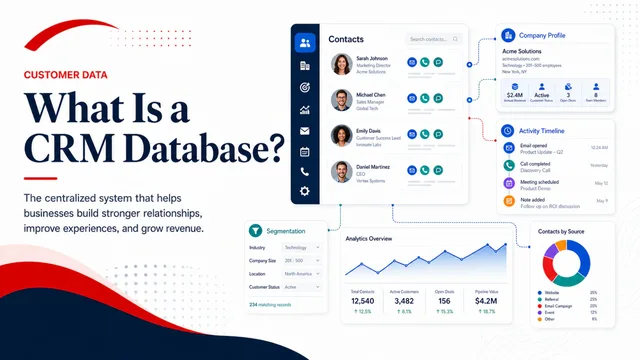
Direct answer: A CRM database is the structured customer record behind a CRM: contacts, companies, conversations, consent, purchases, opportunities, tasks, and the relationships between them.
The database should give each customer-facing team enough context to act without creating duplicate records or exposing data to people who do not need it.
What matters most
Decision area
What to verify
Identity and deduplication
Test this area with a representative workflow, current official documentation, and the plan limits that apply to your use case.
Activity history
Test this area with a representative workflow, current official documentation, and the plan limits that apply to your use case.
Lifecycle and pipeline fields
Test this area with a representative workflow, current official documentation, and the plan limits that apply to your use case.
Consent and communication preferences
Test this area with a representative workflow, current official documentation, and the plan limits that apply to your use case.
Permissions, retention, and exports
Test this area with a representative workflow, current official documentation, and the plan limits that apply to your use case.
Where HubSpot fits
HubSpot is designed for sales follow-up, agency pipelines, and customer management. Its stated role is CRM, marketing, and sales platform. Verify that positioning against a real workflow rather than relying on a feature checklist alone.
A practical way to evaluate it
Define the minimum customer record.
Choose a unique identifier and duplicate policy.
Document required fields by lifecycle stage.
Test imports and exports before migration.
Assign ownership for data quality after launch.
Common mistakes to avoid
Importing every legacy field without a use case
Allowing uncontrolled free-text values
Ignoring consent, retention, and role-based access
Evidence to collect before buying software
A completed end-to-end test using representative data and user roles.
The first plan that includes the required limits, integrations, permissions, and support.
A 12-month estimate that includes add-ons, implementation, migration, and likely growth.
An export or exit path for critical customer, content, and reporting data.
Final takeaway
Use this topic to narrow the buying decision, not to justify a tool prematurely. The right next step is a small proof using real inputs, a clearly defined success measure, and one credible alternative for comparison.