Builderall and Weebly are two widely recognized website-building platforms, each catering to different types of users. Builderall is an all-in-one digital marketing suite designed for entrepreneurs and businesses that need robust online tools, including sales funnels, automation, and email marketing. On the other hand, Weebly is a beginner-friendly website builder with a simple drag-and-drop interface, making it an excellent choice for small businesses and individuals.
When choosing between these platforms, one crucial factor to consider is the global shift towards digital presence—according to Forbes, 71% of small businesses have a website in 2024, and the demand for user-friendly website builders continues to rise. With this increasing trend, selecting the right platform becomes even more essential. In this comparison, we’ll break down the features, ease of use, customization options, and pricing to help you decide whether Builderall or Weebly is the right fit for your business.
Table of Contents
A Quick Comparison Overview
Builderall and Weebly are two popular website builders, each catering to different needs. Builderall is known for its all-in-one digital marketing suite, while Weebly is a user-friendly website builder focused on simplicity. If you’re looking for an affordable and feature-rich platform, which one should you choose? Let’s dive deep into the comparison and explore the strengths and weaknesses of each.
Quick Comparison Table
| Feature | Builderall | Weebly |
| Ease of Use | Moderate | Very Easy |
| Learning Curve | Steep | Minimal |
| Best For | Digital Marketers & Entrepreneurs | Small Businesses & Beginners |
| Website Builder | Yes (Cheetah Builder) | Yes |
| Customization | Extensive | Limited |
| Online Courses | Yes | No |
| Membership Sites | Yes | Limited |
| eCommerce Support | Yes | Yes (via Square) |
| Pricing | Varies (Multiple Plans) | Affordable |

What is Builderall?
Builderall is a comprehensive digital marketing platform offering tools for website creation, sales funnels, email marketing, automation, and more. It is designed for marketers, entrepreneurs, and businesses that need a robust solution to manage their online presence. With a variety of tools integrated into one platform, Builderall eliminates the need for multiple third-party subscriptions, making it a cost-effective choice for digital entrepreneurs. However, its vast array of features can be overwhelming for beginners, requiring a steeper learning curve than more simplified website builders.
What is Weebly?
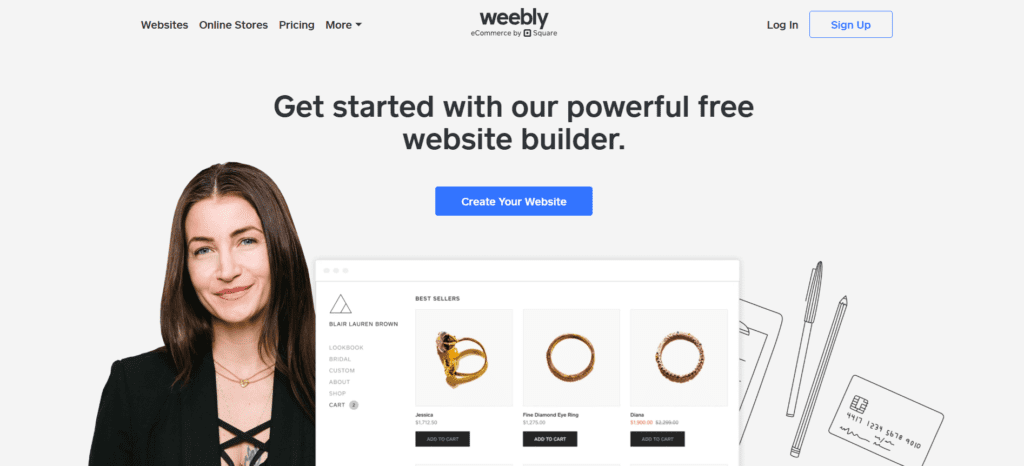
Weebly, owned by Square, is a drag-and-drop website builder known for its simplicity and ease of use. It is best suited for small businesses, personal websites, and eCommerce stores that need a reliable and straightforward platform. Weebly’s intuitive editor allows users to build professional-looking websites quickly, even with no prior coding experience. Its integration with Square also makes it a great choice for businesses that require seamless payment processing. However, while Weebly is easy to use, it lacks some advanced marketing tools and customization options available in Builderall.
User Interface
Builderall
Builderall provides a feature-packed interface that is both powerful and complex. The platform includes multiple tools and builders, such as the Cheetah Website Builder and the Canvas Funnel Builder, which allow users to create highly customized websites and sales funnels. While these tools are excellent for experienced marketers, the interface can feel cluttered and overwhelming for those unfamiliar with digital marketing platforms. Users must invest time in learning how to navigate Builderall’s ecosystem effectively, but once mastered, it offers unparalleled flexibility.
Weebly
Weebly’s interface is clean, simple, and easy to navigate, making it ideal for beginners. The drag-and-drop functionality allows users to build websites effortlessly without dealing with complex settings or coding. Everything is neatly organized, with intuitive menus and straightforward design options. Weebly focuses on ease of use, ensuring that even those with no technical background can create a professional-looking website in minutes. However, this simplicity comes at the cost of customization, as Weebly provides fewer design and layout options compared to Builderall.
Comparison Table: User Interface
| Feature | Builderall | Weebly |
| Ease of Use | Moderate | Very Easy |
| Learning Curve | Steep | Minimal |
| Drag-and-Drop Builder | Yes (Cheetah Builder) | Yes |
| Customization | Extensive | Limited |
🏆 Winner: Weebly – Best for beginners due to its simplicity.
Online Courses and Memberships
Builderall
Builderall includes a comprehensive e-learning platform, allowing users to create and sell online courses with ease. It provides features such as video hosting, student management, quizzes, and certificates, making it a great choice for educators and digital entrepreneurs. Additionally, Builderall supports membership sites, enabling content creators to offer exclusive content behind a paywall. This makes it a powerful tool for those looking to generate recurring revenue through online courses and memberships. The platform also integrates with email marketing and automation tools to enhance the user experience for students and members.
Weebly
Weebly, on the other hand, does not have a built-in e-learning system. While it allows users to create simple membership sites, it lacks the advanced course-building features found in Builderall. Users who want to sell online courses on Weebly must rely on third-party integrations such as Thinkific and Teachable, which can add extra costs and setup complexity. Although Weebly is a solid platform for general website creation, its limitations in this area make it less suitable for those focused on online education.
Comparison Table: Online Courses and Memberships
| Feature | Builderall | Weebly |
| Built-in Course Platform | Yes | No |
| Membership Site Support | Yes | Limited |
| Student Management | Yes | No |
🏆 Winner: Builderall – Ideal for online educators.
Community, Design & Customization
Builderall
Builderall offers extensive customization capabilities, making it a favorite among marketers and designers who need full control over their website’s look and feel. With hundreds of templates, advanced design tools, and full control over CSS and HTML, users can create highly unique and branded websites. The platform also provides various animation and interactive elements, helping businesses stand out with engaging visuals. However, the flexibility comes with a learning curve, as users must navigate Builderall’s advanced settings to fully utilize its potential.
Weebly
Weebly provides a simple design interface with professionally designed themes, but limited customization options compared to Builderall. The platform offers a handful of pre-made templates, and while users can modify colors, fonts, and layouts, deeper customization is restricted. Unlike Builderall, Weebly does not offer full HTML or CSS editing, which can be a drawback for businesses that require a distinct and highly personalized web presence.
Comparison Table: Community, Design & Customization
| Feature | Builderall | Weebly |
| Customization Options | High | Limited |
| Templates Available | 400+ | 50+ |
| HTML/CSS Editing | Yes | No |
🏆 Winner: Builderall – Best for those who need deep customization.
Email Marketing & Automation
Builderall
Builderall comes equipped with a robust email marketing system called MailingBoss, which allows unlimited subscribers, automated workflows, and advanced segmentation. It integrates seamlessly with the platform’s sales funnels, making it a great choice for businesses that rely on email marketing. With features such as behavioral targeting, custom triggers, and automated follow-ups, Builderall ensures that businesses can maintain strong engagement with their audience.
Weebly
Weebly offers basic email marketing through Weebly Promote, which is beginner-friendly but lacks advanced automation and segmentation features. While it allows for email campaigns and newsletters, it does not provide the level of control and customization found in Builderall. This makes Weebly more suitable for small businesses or hobbyists who only need simple email marketing functions.
| Feature | Builderall | Weebly |
| Email Automation | Yes, advanced | Basic |
| Segmentation | Yes | Limited |
| Integration with Sales Funnels | Yes | No |
| Subscription Limits | Unlimited | Limited |
🏆 Winner: Builderall – More advanced automation and unlimited email capabilities.
Sales Funnels & Campaigns
Builderall
Builderall provides a complete sales funnel builder, allowing users to create multi-step sales sequences, opt-in pages, and upsell flows with ease. It’s ideal for entrepreneurs focused on digital marketing and lead conversion. With pre-designed funnel templates, users can quickly set up automated sales sequences without needing technical expertise.
Weebly
Weebly lacks built-in funnel-building tools. Users need third-party integrations to set up sales funnels, which adds complexity and cost. This can be a limitation for businesses looking to streamline lead generation and conversion.
| Feature | Builderall | Weebly |
| Sales Funnel Builder | Yes | No |
| Pre-Designed Templates | Yes | No |
| Upsell & Downsells | Yes | No |
| Integration with CRM | Yes | Limited |
🏆 Winner: Builderall – Offers built-in, easy-to-use sales funnel tools.
Checkout Pages & Payments
Builderall
Builderall includes an integrated checkout system that supports multiple payment gateways, digital product sales, and subscription management. Users can create high-converting checkout pages with upsell and downsell features, enhancing revenue potential.
Weebly
Weebly’s checkout system is primarily designed for e-commerce stores using Weebly’s Square integration, making it less flexible for digital products and memberships. While it allows product sales, it lacks advanced marketing-focused checkout features.
| Feature | Builderall | Weebly |
| Payment Gateways | Multiple | Square |
| Subscription Management | Yes | No |
| Digital Products | Yes | Limited |
| Upsell & Downsell Options | Yes | No |
🏆 Winner: Builderall – More versatile checkout and payment processing.
Integrations
Builderall
Builderall integrates with major payment gateways, webinar tools, and CRM platforms, giving users full control over their marketing and automation processes. Users can connect third-party tools via API or Zapier for expanded functionality.
Weebly
Weebly supports integrations through Zapier, but its direct integrations are limited compared to Builderall.
| Feature | Builderall | Weebly |
| Direct Integrations | Many | Few |
| API Access | Yes | No |
| Webinar Integration | Yes | No |
| CRM Integration | Yes | Limited |
🏆 Winner: Builderall – Offers more built-in integrations.
Mobile App
Builderall
Builderall has a dedicated mobile app allowing users to manage their business on the go, including email marketing, sales funnels, and analytics.
Weebly
Weebly’s mobile app focuses more on website editing and order management, making it useful but not as feature-rich for full business operations.
| Feature | Builderall | Weebly |
| Mobile App | Yes | Yes |
| Manage Funnels | Yes | No |
| Email Marketing | Yes | No |
| Analytics | Yes | Yes |
🏆 Winner: Builderall – More comprehensive mobile business management.
Pricing Showdown
Builderall Pricing
Builderall offers several pricing plans to cater to different business needs. Its pricing is structured to include essential marketing tools like funnels, automation, and email marketing. The plans range from entry-level options for beginners to comprehensive packages for advanced users.
Weebly Pricing
Weebly has a more straightforward pricing model, primarily designed for website building rather than full-scale digital marketing. It offers free and paid plans, with the premium options adding eCommerce and site customization capabilities.
Pricing Comparison Table
| Feature | Builderall | Weebly |
| Free Plan | No | Yes |
| Basic Plan | $16.90/month | $10/month |
| Mid-Tier Plan | $26.90/month | $12/month |
| High-Tier Plan | $69.90/month | $26/month |
| Sales Funnels | Yes | No |
| Email Marketing | Yes | Limited |
| E-commerce Features | Yes | Yes |
| Hosting Included | Yes | Yes |
🏆 Winner: Builderall – More marketing tools and sales funnel capabilities justify the cost for businesses needing an all-in-one solution.
Final Verdict
- Choose Builderall if you need advanced marketing tools, funnel builders, and membership site capabilities. Its all-in-one digital marketing suite makes it ideal for businesses looking to scale their online presence.
- Choose Weebly if you prefer simplicity, affordability, and ease of use. It is a great option for beginners, small businesses, and those who prioritize ease of website building over advanced marketing functionalities.
Pro Tip:
If you are serious about scaling your online business, Builderall provides a more comprehensive set of tools than Weebly, making it the better long-term investment.
FAQs
1. Which platform is better for beginners?
Weebly is easier to use with a simple drag-and-drop interface, making it ideal for beginners.
2. Can Builderall be used for eCommerce?
Yes, Builderall includes eCommerce features, allowing users to create online stores with integrated payment systems.
3. Does Weebly offer email marketing tools?
Weebly has limited email marketing capabilities, whereas Builderall provides a full suite of marketing tools.
4. Which platform is better for digital marketing?
Builderall is the better option for digital marketing due to its sales funnels, automation, and integrated email marketing.
5. Do these platforms offer free trials?
Weebly offers a free plan, while Builderall provides a 14-day free trial for new users.

Romil Aggrawal is a skilled Technical Content Writer and SEO Expert with a passion for simplifying complex concepts. With years of experience in crafting engaging, user-friendly content, Romil has personally tested and reviewed a wide range of tools and software to deliver in-depth, honest insights. His expertise in SEO ensures that his content not only informs but also ranks, helping businesses reach their audience effectively. Romil's dedication to quality and attention to detail make him a trusted voice in the tech and digital marketing space.