
Kajabi has become one of the leading platforms for creating, managing, and selling online courses and digital products. Entrepreneurs, coaches, and businesses rely on its all-in-one system to handle everything from website hosting to email marketing and sales funnels. However, for an even more powerful and streamlined workflow, integrating Kajabi with other tools is essential.
📊 Fact: Kajabi has generated over $4 billion in revenue for its users and continues to grow rapidly, helping more than 100,000 businesses scale their digital presence (Source: Kajabi.com).
This guide will walk you through how to integrate Kajabi with essential platforms like payment gateways, email marketing services, CRMs, and automation tools like Zapier.
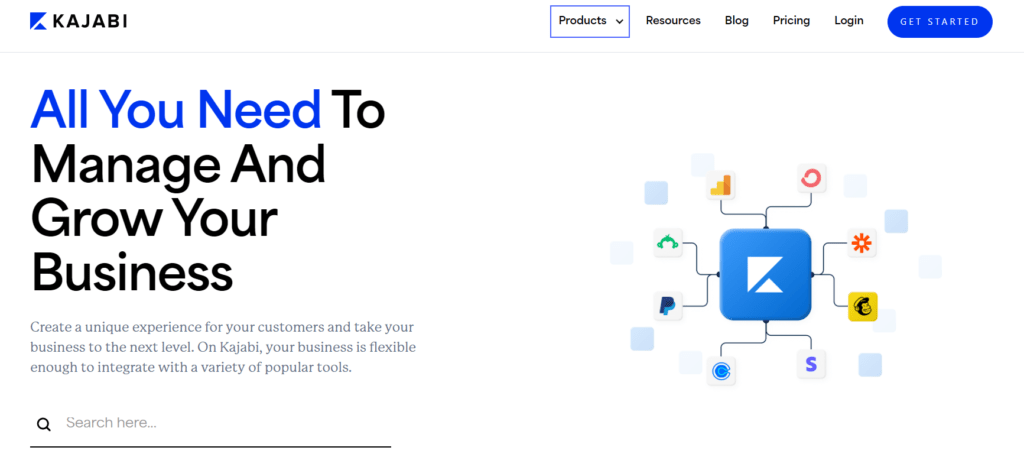
Table of Contents
Understanding Kajabi Integration
What Does It Mean to Integrate Kajabi?
Integrating Kajabi means connecting it with third-party platforms to automate processes, synchronize data, and improve business efficiency. By integrating Kajabi, you can:
- Automate your email marketing (e.g., ActiveCampaign, ConvertKit).
- Process payments easily (e.g., Stripe, PayPal).
- Manage customer data seamlessly (e.g., HubSpot, Zoho CRM).
- Track website and user behavior (e.g., Google Analytics, Facebook Pixel).
Common Tools and Platforms That Work with Kajabi
Kajabi supports integrations with a variety of tools, categorized as follows:
| Category | Supported Tools |
| Payment Gateways | Stripe, PayPal |
| Email Marketing | ConvertKit, Mailchimp, ActiveCampaign |
| CRM Systems | HubSpot, Zoho CRM |
| Analytics | Google Analytics, Facebook Pixel, Segment |
| Automation Tools | Zapier, Make (formerly Integromat) |
Step-by-Step Guide on How to Integrate Kajabi
1. Prerequisites Before Starting
Before integrating any service with Kajabi, ensure you have:
✅ An active Kajabi account
✅ Admin access to third-party platforms (e.g., Stripe, PayPal)
✅ API keys for the services you want to connect
2. How to Connect Kajabi with Payment Gateways
Kajabi supports Stripe and PayPal for payment processing. Here’s how to integrate them:
| Step | Action |
| 1 | Go to Kajabi Dashboard and click Settings |
| 2 | Select Payment Integrations |
| 3 | Choose Stripe or PayPal and click “Connect” |
| 4 | Log in to your payment provider and authorize access |
| 5 | Configure your pricing plans and subscriptions |
Benefits of integrating Stripe and PayPal:
✔ Automate transactions securely
✔ Enable one-time or recurring payments
✔ Support multiple currencies for international sales
Pro Tip: Always conduct a test transaction to ensure the integration is working correctly.
3. Integrating Kajabi with Email Marketing Platforms
Kajabi supports email marketing integration with platforms like ConvertKit, Mailchimp, and ActiveCampaign.
Steps to Integrate Kajabi with ConvertKit (Example)
1️⃣ Navigate to Kajabi Settings → Marketing
2️⃣ Click on Email Integrations
3️⃣ Select ConvertKit
4️⃣ Enter your ConvertKit API key
5️⃣ Click Connect and verify by sending a test email
4. Setting Up Kajabi with CRM Systems
A Customer Relationship Management (CRM) system helps you organize and track customer interactions.
How to Connect Kajabi with HubSpot
- Install the Kajabi-HubSpot connector
- Map Kajabi form fields to HubSpot fields
- Set up email automation triggers for new sign-ups
Using Zoho CRM with Kajabi via Zapier
- Create a new Zap in Zapier
- Choose Kajabi as the Trigger App
- Select Zoho CRM as the Action App
- Map customer data fields between Kajabi and Zoho
5. Connecting Kajabi with Zapier for Automation
Zapier allows Kajabi users to connect with thousands of apps without needing to code.
Popular Kajabi-Zapier Workflows:
✅ Add new Kajabi customers to a Google Sheet
✅ Send Kajabi sign-ups to a Slack channel
✅ Trigger Kajabi email sequences when a Stripe payment is received
How to Set Up a Kajabi-Zapier Workflow:
1️⃣ Create a Zap
2️⃣ Choose Kajabi as the Trigger App
3️⃣ Select an event (e.g., New Purchase)
4️⃣ Choose an Action App (e.g., Google Sheets, Slack)
5️⃣ Map the required fields and test the automation
Kajabi API and Webhooks
How to Use Kajabi API for Advanced Integrations
Kajabi provides an API for developers to build custom integrations.
- Steps to Use Kajabi API:
- Go to Kajabi Settings → API
- Generate an API Key
- Use the API key to connect with third-party apps
Configuring Webhooks in Kajabi
Webhooks help Kajabi send real-time updates to other platforms.
- Steps to Configure Webhooks:
- Navigate to Kajabi Developer Tools
- Select Create Webhook
- Add the Webhook URL for the receiving app
Comparison Table: Kajabi vs. Other Course Platforms
| Feature | Kajabi | Teachable | Thinkific | Podia |
| All-in-One Platform | ✅ | ❌ | ❌ | ❌ |
| Built-in Email Marketing | ✅ | ❌ | ✅ | ✅ |
| Payment Integrations | ✅ Stripe, PayPal | ✅ Stripe | ✅ Stripe | ✅ PayPal |
| Advanced Automations | ✅ Zapier, API | ❌ | ✅ | ✅ |
Troubleshooting Kajabi Integration Issues
Why Your Kajabi Integration Might Not Work
🚨 Incorrect API key or authentication
🚨 Expired third-party service credentials
🚨 Kajabi account limitations on API usage
How to Fix Kajabi Integration Errors
✅ Re-enter API credentials
✅ Ensure all apps are updated
✅ Contact Kajabi support if the issue persists
Conclusion
Integrating Kajabi with payment gateways, email marketing tools, and CRMs can help you automate workflows, reduce manual work, and enhance customer experience. Whether you’re selling online courses or digital products, the right integrations can supercharge your business operations.
Pro Tip:
💡 For the best results, always test integrations with a small group of users before fully rolling them out.
FAQs
1. Can I integrate Kajabi with WordPress?
Yes, by embedding Kajabi forms and using webhooks.
2. Does Kajabi support multiple payment gateways?
Yes, Kajabi integrates with both Stripe and PayPal.
3. How can I automate emails in Kajabi?
Use Kajabi’s built-in email tool or connect with ActiveCampaign.
4. Is Zapier required for Kajabi integrations?
Not always, but it helps automate non-native integrations.
5. Does Kajabi support live webinars?
Yes, you can integrate Kajabi with Zoom or WebinarJam.

Romil Aggrawal is a skilled Technical Content Writer and SEO Expert with a passion for simplifying complex concepts. With years of experience in crafting engaging, user-friendly content, Romil has personally tested and reviewed a wide range of tools and software to deliver in-depth, honest insights. His expertise in SEO ensures that his content not only informs but also ranks, helping businesses reach their audience effectively. Romil's dedication to quality and attention to detail make him a trusted voice in the tech and digital marketing space.