
When it comes to online course platforms, two big names dominate the market—Kajabi and Udemy. Both platforms serve different purposes and cater to different types of users. If you are an aspiring course creator or entrepreneur, you may be wondering which one is the best fit for your business.When choosing a platform to create and sell online courses, it’s essential to understand the differences between Kajabi and Udemy. Kajabi is an all-in-one business platform that allows creators to build, market, and sell their own courses with full control over pricing and branding. In contrast, Udemy is a marketplace where instructors can upload courses but have limited control over pricing and rely on Udemy’s promotional strategies. As of 2024, Udemy offers more than 210,000 online video courses and has over 69 million students.
Before we dive into the in-depth comparison, here is a quick look at how Kajabi and Udemy compare:
| Feature | Kajabi | Udemy |
| Ownership & Branding | ✅ Full Control | ❌ No Control |
| Pricing Control | ✅ Yes | ❌ No |
| Memberships & Subscriptions | ✅ Yes | ❌ No |
| Marketplace Traffic | ❌ No | ✅ Yes |
| Marketing Tools | ✅ Yes | ❌ No |
| Revenue Share | ✅ 100% (minus payment fees) | ❌ 50%-70% revenue split |
| Community Features | ✅ Yes | ❌ No |
| Learning Engagement | ✅ Advanced | ✅ Basic |
Now, let’s break down these differences in detail to help you make an informed decision.
Table of Contents
Overview

What is Kajabi?
Kajabi is an all-in-one platform that helps entrepreneurs, coaches, and educators create, market, and sell online courses and memberships. Unlike Udemy, which is a marketplace, Kajabi allows you to build your own brand, host your courses on your own website, and have full control over pricing.
What is Udemy?
Udemy is an online learning marketplace with thousands of courses across various topics. It’s an excellent platform for instructors who want to leverage an existing audience without worrying about website development or marketing. However, Udemy controls course pricing, and instructors earn only a fraction of the total revenue.
User Interface (UI) & Ease of Use
Kajabi
Kajabi’s user interface is designed to provide a smooth and professional experience for course creators and students. It features a drag-and-drop builder that allows users to create stunning course pages, membership sites, and marketing funnels without needing any technical expertise. The dashboard is intuitive, making it easy to manage content, track student progress, and automate email sequences. Kajabi also provides mobile-responsive designs, ensuring courses look professional on all devices. Its sleek and modern interface makes it stand out compared to Udemy, offering complete customization for branding.
- Kajabi provides an intuitive and modern dashboard with easy navigation.
- The drag-and-drop page builder makes website and course creation effortless.
- Offers pre-designed templates for landing pages, sales funnels, and courses.
- No coding knowledge is required.
Udemy
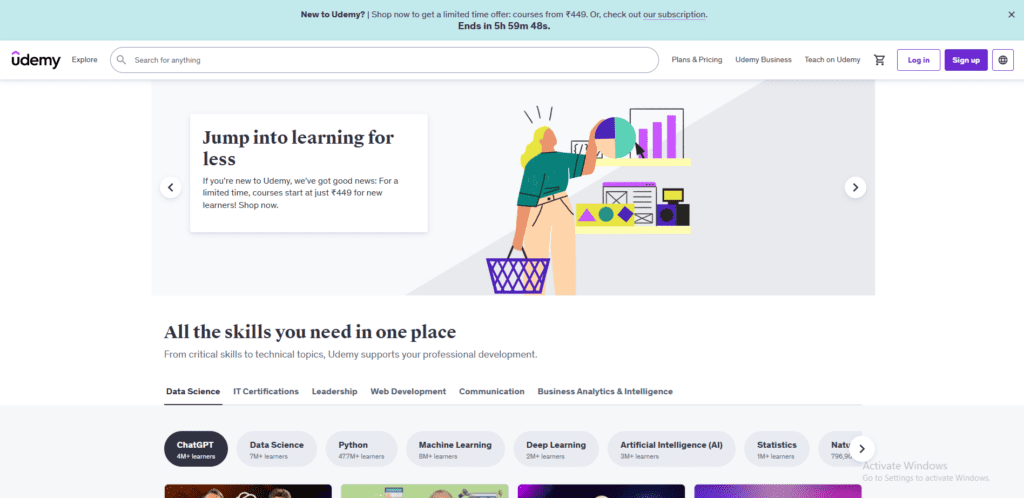
Udemy’s user interface is straightforward but lacks flexibility in design and customization. As an instructor, you can only fill in predefined course templates without much room for branding or unique layouts. While Udemy provides a simple dashboard for uploading course materials, creating quizzes, and managing students, it doesn’t offer the level of control that Kajabi does. The mobile app is well-optimized for learners, but instructors have no say in how their courses appear, as all Udemy courses follow the same format.
- Udemy has a straightforward course upload process.
- The interface is optimized for students, making it easy for them to find courses.
- Course creation is structured with a step-by-step process for adding content.
- Limited design customization options for instructors.
Comparison Table: User Interface
| Feature | Kajabi | Udemy |
| Customizable Website | ✅ Yes | ❌ No |
| Drag-and-Drop Builder | ✅ Yes | ❌ No |
| Pre-Built Templates | ✅ Yes | ❌ No |
| Easy Course Upload | ✅ Yes | ✅ Yes |
🏆 Winner: Kajabi – It offers more flexibility and customization.
Online Courses and Memberships
Kajabi
Kajabi offers robust features for course creation and membership sites. It allows creators to design structured courses with modules, lessons, quizzes, and downloadable resources. Unlike Udemy, where pricing is controlled by the platform, Kajabi users have complete freedom to set their course prices, offer subscriptions, and sell premium memberships. Drip content, automation, and progress tracking are also available, ensuring a smooth learning experience. Additionally, Kajabi enables users to bundle courses together and provide upsells, increasing revenue potential.
- Allows you to create and sell courses on your own branded website.
- Offers features like quizzes, video hosting, and assessments to enhance learning.
- Provides membership options, so you can offer exclusive content to paid members.
- No restrictions on pricing—set your own rates.
Udemy
Udemy primarily focuses on individual course sales without support for memberships or coaching programs. Instructors upload videos, create quizzes, and offer certificates upon course completion, but they do not have control over pricing or promotions. Udemy often runs deep discounts on courses, sometimes reducing prices to as low as $10, which can affect an instructor’s earnings significantly. Additionally, Udemy does not allow direct contact with students outside of the platform, limiting relationship-building opportunities for long-term business growth.
- Course creation is limited to Udemy’s structure and guidelines.
- Instructors don’t control course pricing—Udemy runs frequent discounts.
- There is no membership option, only one-time course sales.
- Courses are listed alongside thousands of competitors.
Comparison Table: Course Creation & Memberships
| Feature | Kajabi | Udemy |
| Membership Options | ✅ Yes | ❌ No |
| Full Pricing Control | ✅ Yes | ❌ No |
| Learning Engagement Features | ✅ Yes | ✅ Yes |
| Control Over Branding | ✅ Yes | ❌ No |
🏆 Winner: Kajabi – It gives full control to course creators.
Community, Design & Customization
Kajabi
Kajabi offers advanced customization options for building an engaging community around a course or membership site. Users can create private discussion forums, offer gamified learning experiences, and set up dedicated spaces for student interaction. The platform allows full control over the course’s design, ensuring it matches the creator’s brand. This flexibility is crucial for building long-term relationships with students and enhancing the overall user experience.
- Includes a built-in community feature similar to Facebook groups.
- Offers custom branding and full website customization.
- Allows users to create private communities and discussion boards.
- More interactive learning experience for students.
Udemy
Udemy provides limited engagement options for students and instructors. Courses come with a basic Q&A discussion board where students can ask questions, but there are no features for private communities, interactive forums, or direct engagement outside of the platform. Udemy also enforces its own branding, making it difficult for instructors to build a recognizable identity.
- Does not allow for community building within the platform.
- Courses are displayed in a generic Udemy-branded format.
- No options for creating a membership community.
- Students interact via Q&A sections, but engagement is limited.
Comparison Table: Community & Customization
| Feature | Kajabi | Udemy |
| Private Community | ✅ Yes | ❌ No |
| Branding Control | ✅ Yes | ❌ No |
| Membership Engagement | ✅ Yes | ❌ No |
| Discussion Boards | ✅ Yes | ❌ No |
🏆 Winner: Kajabi – It offers better community features and customization.
Email Marketing & Automation
Udemy
Udemy does not provide built-in email marketing features. Instead, it allows instructors to send limited promotional emails to students, but these are heavily restricted by Udemy’s guidelines. Instructors cannot create automated sequences, segment audiences, or build a proper email marketing funnel to convert leads into sales. This lack of automation makes it difficult for instructors to nurture relationships with potential students or encourage repeat purchases.
Kajabi
Kajabi offers a fully integrated email marketing system, allowing course creators to send broadcast emails, drip campaigns, and automated sequences. Instructors can create behavior-based automation, meaning emails are triggered based on student activity. Additionally, Kajabi allows A/B testing, lead segmentation, and detailed analytics to help course creators optimize their email campaigns.
Comparison Table
| Feature | Udemy | Kajabi |
| Built-in Email Marketing | ❌ No | ✅ Yes |
| Automation & Triggers | ❌ No | ✅ Yes |
| A/B Testing | ❌ No | ✅ Yes |
| Lead Segmentation | ❌ No | ✅ Yes |
🏆 Winner: Kajabi (for its advanced email marketing automation).
Sales Funnels & Campaigns
Udemy
Udemy does not provide sales funnel tools for instructors. Instead, all courses are listed in Udemy’s marketplace, where pricing, discounts, and promotions are controlled by Udemy. Instructors have little to no control over the student journey, making it difficult to create upsells, downsells, or retargeting campaigns. Udemy does offer course recommendation algorithms, but they are not customizable for individual instructors.
Kajabi
Kajabi is designed for entrepreneurs and course creators who want to build their own funnels. It includes landing pages, sales pipelines, and automation tools that allow users to create multi-step campaigns for attracting leads and converting them into paying students. Unlike Udemy, Kajabi users have full control over pricing, discounts, and promotions.
Comparison Table
| Feature | Udemy | Kajabi |
| Pre-Built Funnels | ❌ No | ✅ Yes |
| Upsells & Downsells | ❌ No | ✅ Yes |
| Automated Campaigns | ❌ No | ✅ Yes |
🏆 Winner: Kajabi (for full funnel-building capabilities).
Checkout Pages & Payments
Udemy
Udemy’s checkout process is simple, but instructors have no control over it. The platform processes payments on behalf of the instructor and takes a significant percentage of each sale. Udemy runs frequent discount promotions, which can undervalue an instructor’s course.
Kajabi
Kajabi provides custom checkout pages that course creators can modify to match their brand. Instructors can set their own pricing, offer payment plans, and include order bumps or upsells during checkout. Payments are processed directly through Stripe or PayPal, so instructors keep more of their revenue.
Comparison Table
| Feature | Udemy | Kajabi |
| Pricing Control | ❌ No | ✅ Yes |
| Custom Checkout Pages | ❌ No | ✅ Yes |
| Payment Plans | ❌ No | ✅ Yes |
🏆 Winner: Kajabi (for flexible and customizable payment options).
Integrations
Udemy
Udemy does not integrate with third-party marketing or CRM tools. Instructors must rely entirely on Udemy’s built-in features, which are limited.
Kajabi
Kajabi integrates with Zapier, ConvertKit, ActiveCampaign, MailChimp, ClickFunnels, and more. This allows course creators to connect their business to external marketing tools and CRM platforms for advanced customer management.
Comparison Table
| Feature | Udemy | Kajabi |
| Third-Party Integrations | ❌ No | ✅ Yes |
🏆 Winner: Kajabi (for offering integrations with top marketing tools).
Mobile App
Udemy
Udemy has a dedicated mobile app that allows students to watch courses on the go. This is a major advantage for instructors who want their courses to be easily accessible.
Kajabi
Kajabi also has a mobile app, but it is designed for both instructors and students, offering more flexibility in managing courses.
Comparison Table
| Feature | Udemy | Kajabi |
| Mobile App for Students | ✅ Yes | ✅ Yes |
| Mobile App for Instructors | ❌ No | ✅ Yes |
🏆 Winner: Kajabi (for its instructor-friendly mobile app).
Pricing Comparison: Kajabi vs. Udemy
Pricing is one of the biggest deciding factors for most course creators. Here’s how the two platforms compare.
Kajabi Pricing Plans

One of the biggest advantages of Kajabi is that it does not take a commission on sales. Instructors keep 100% of their earnings after payment processing fees. Additionally, Kajabi includes powerful email marketing, automation, and landing page tools, making it an excellent choice for serious educators and business owners.
Kajabi follows a subscription-based pricing model with three main plans:
| Plan | Monthly Price | Annual Price (Save 20%) | Courses | Members | Websites |
| Basic | $149/month | $119/month | 3 | 1,000 | 1 |
| Growth | $199/month | $159/month | 15 | 10,000 | 1 |
| Pro | $399/month | $319/month | 100 | 20,000 | 3 |
💡 All Kajabi plans include:
- Unlimited landing pages & marketing emails
- Automation tools
- Integrated payment processing
- No transaction fees
Udemy Pricing Model
Unlike Kajabi, Udemy does not charge any upfront fees to create and sell courses. Instead, it operates on a revenue-sharing model, where instructors earn a percentage of each sale depending on how the student discovers their course.
Udemy has no upfront costs but takes a commission from each sale:
| Sales Channel | Revenue Share for Instructor |
| Organic Sales (Your Promotion) | 97% Instructor – 3% Udemy |
| Udemy-Promoted Sales | 37% Instructor – 63% Udemy |
| Affiliate & Ads Sales | 25% Instructor – 75% Udemy |
💡 Key takeaways:
- Udemy is free to join, but you only earn when your course sells.
- If students purchase your course through Udemy’s marketing (ads, promotions), you only receive 37% of the revenue.
- Limited pricing control – Udemy often discounts courses significantly.
Customer Support Comparison
Kajabi offers 24/7 live chat support on its Growth and Pro plans, ensuring that users can get immediate assistance whenever needed. Email support is available on all plans, and there is a comprehensive help center with detailed guides and video tutorials. Additionally, Kajabi has a thriving community of course creators, including an official Facebook group where users can ask questions and share best practices.
Udemy, in contrast, does not provide live chat support. Instead, instructors can submit email support tickets and receive responses within a few business days. Udemy also has an instructor community forum, where users can seek help from other course creators. However, since Udemy operates as a marketplace, instructors have less direct support for managing their course sales and student interactions.
Having reliable customer support is crucial when managing an online business. Here’s how Kajabi and Udemy compare:
| Support Feature | Kajabi | Udemy |
| Live Chat | ✅ 24/7 (Growth & Pro) | ❌ Not Available |
| Email Support | ✅ Available | ✅ Available |
| Phone Support | ❌ No | ❌ No |
| Community Support | ✅ Active Facebook Group & Kajabi Community | ✅ Instructor Community |
| Help Center | ✅ Comprehensive | ✅ Basic Guides |
- Kajabi offers superior support with 24/7 live chat (for Growth & Pro plans), which Udemy lacks.
- Udemy has an active instructor community and a help center, but no real-time support.
Conclusion
Kajabi and Udemy are both powerful platforms, but they cater to different needs. Kajabi is best for entrepreneurs and businesses who want complete control over their courses, branding, and pricing. On the other hand, Udemy is ideal for instructors who want to sell without worrying about marketing, but they must accept Udemy’s pricing policies and revenue split.
Ultimately, the right platform for you depends on whether you value control and higher earnings (Kajabi) or access to a ready-made audience (Udemy).
FAQs
1. Which platform is better for course creation?
Kajabi is better for professional course creation, while Udemy is good for reaching a wider audience.
2. Can I use Udemy for memberships?
No, Udemy does not support memberships or subscriptions.
3. Which platform is more affordable for small businesses?
Udemy is free, but Kajabi provides better long-term revenue control.
4. Does Kajabi include sales funnel tools?
Yes, Kajabi offers built-in landing pages, automation, and sales funnels.
5. Do these platforms offer free trials?
Udemy is always free for instructors, while Kajabi offers a 14-day free trial.

Romil Aggrawal is a skilled Technical Content Writer and SEO Expert with a passion for simplifying complex concepts. With years of experience in crafting engaging, user-friendly content, Romil has personally tested and reviewed a wide range of tools and software to deliver in-depth, honest insights. His expertise in SEO ensures that his content not only informs but also ranks, helping businesses reach their audience effectively. Romil's dedication to quality and attention to detail make him a trusted voice in the tech and digital marketing space.