If you’re looking for an all-in-one digital marketing platform, Builderall is often a top choice. Builderall is a subscription-based platform that provides an all-in-one suite of marketing tools, including website building, email marketing, and automation. It is designed for entrepreneurs who need a quick and easy solution without relying on third-party plugins or complex technical setups. On the other hand, WordPress is an open-source CMS that offers unparalleled flexibility. While it requires hosting and additional tools, WordPress gives users complete control over their website’s design and functionality, making it an industry favorite for businesses of all sizes.
However, WordPress powers over 43% of all websites on the internet, making it the most popular CMS in the world. Both platforms offer unique features for website building, online marketing, and business automation, but which one is best for your needs? Let’s break it down.
| Feature | Builderall | WordPress |
| Ease of Use | Beginner-friendly drag-and-drop | Slight learning curve but highly flexible |
| Customization | Limited to pre-built tools | Thousands of themes & plugins |
| Pricing | Subscription-based | Free, but requires hosting |
| Best for | All-in-one marketing solutions | Highly customizable websites |
🏆 Winner: Depends on Your Needs – Builderall for marketing automation, WordPress for customization.

Table of Contents
What is Builderall?
Builderall is an all-in-one digital marketing platform that provides users with a variety of built-in tools for website creation, sales funnels, email marketing, and automation. It is designed for entrepreneurs, small businesses, and digital marketers who need an easy-to-use platform to grow their online presence without the hassle of dealing with multiple software solutions. With its intuitive drag-and-drop builder, users can create websites quickly and efficiently. Additionally, Builderall includes pre-designed templates, built-in checkout systems, and a customer relationship management (CRM) tool, making it a convenient choice for those who want an all-inclusive solution.
What is WordPress?
WordPress is an open-source content management system (CMS) that powers millions of websites worldwide. Unlike Builderall, WordPress offers users complete control over their website’s design, functionality, and performance. It requires users to choose their hosting provider, install themes, and add plugins to enhance their website’s capabilities. WordPress is particularly favored by businesses, bloggers, and eCommerce store owners due to its flexibility and extensive plugin ecosystem. From SEO optimization to advanced design customization, WordPress allows users to build websites that can be scaled and tailored to their specific needs.
User Interface
Builderall
Builderall provides a drag-and-drop website builder that simplifies the process of creating web pages. Users can choose from a variety of templates and modify them without requiring coding knowledge. The platform is designed for beginners and entrepreneurs who want to quickly launch their website and start marketing their business. While the interface is straightforward, it can sometimes feel cluttered due to the number of built-in tools available.
WordPress
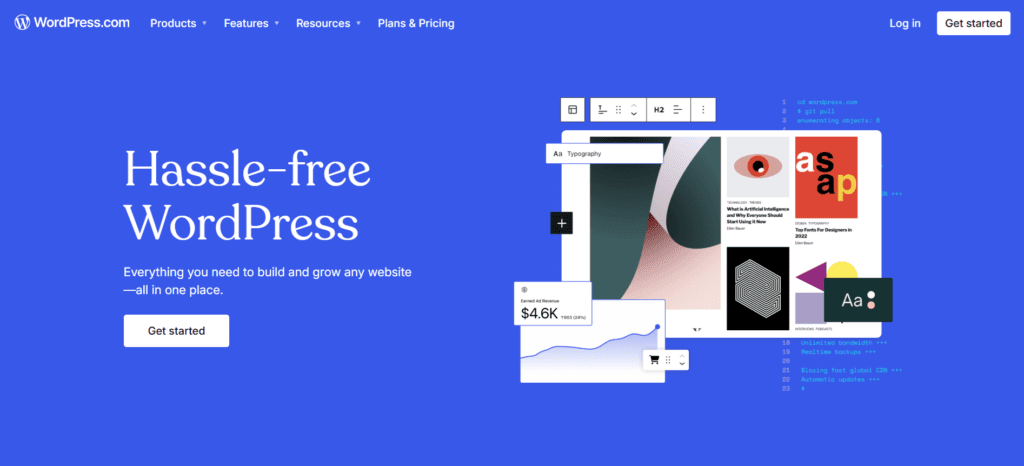
WordPress offers a more complex interface but provides far greater flexibility. The platform is divided into two versions: WordPress.com (a hosted version) and WordPress.org (self-hosted). The self-hosted version allows users to install custom themes, plugins, and design elements. Although it has a steeper learning curve than Builderall, it offers superior control and customization options for users who are willing to invest time in learning the system.
| Aspect | Builderall | WordPress |
| Ease of Use | Very easy | Moderate |
| Learning Curve | Low | Medium to high |
| Customization | Limited | Extensive |
🏆 Winner: WordPress – More flexibility for users who want complete control.
Online Courses and Memberships
Builderall
Builderall includes a membership site feature, allowing users to create gated content for members. However, its learning management system (LMS) capabilities are quite basic compared to dedicated platforms. While it does offer integrations with some external tools, it lacks the advanced features found in premium LMS solutions.
WordPress
WordPress excels in this area with plugins like LearnDash and LifterLMS, which provide full-fledged course creation tools. These plugins allow users to create structured courses, quizzes, and certifications while offering seamless integration with payment gateways and membership management.
| Feature | Builderall | WordPress |
| LMS Support | Basic | Advanced (LearnDash, LifterLMS) |
| Customization | Limited | Extensive |
🏆 Winner: WordPress – Ideal for serious course creators.
Community, Design & Customization
Builderall
Builderall offers a set of pre-built design templates but has limited customization options. The platform has a smaller user community, meaning fewer resources and third-party tools are available for expansion. While it is convenient for beginners, users may find it restrictive in the long run.
WordPress
WordPress boasts a massive global community, providing thousands of themes and design elements. Users can customize their websites in any way they see fit, whether through theme builders like Elementor or through direct code modifications. With an abundance of tutorials and forums, WordPress users have extensive support available.
| Aspect | Builderall | WordPress |
| Community | Small | Large |
| Design Flexibility | Limited | Extensive |
🏆 Winner: WordPress – More support, resources, and design options.
Email Marketing & Automation
Builderall
Builderall offers a built-in email marketing system called MailingBoss, which allows users to create automated email sequences, segment lists, and send broadcasts. The automation capabilities are impressive, as they are directly integrated into the platform’s sales funnels and landing pages. This means users can set up trigger-based emails without relying on third-party software. Additionally, Builderall includes email templates, A/B testing, and analytics, making it a great all-in-one solution for digital marketers.
WordPress
WordPress itself does not have built-in email marketing tools, but it offers integration with leading third-party email services like Mailchimp, ConvertKit, and ActiveCampaign. Users must install plugins to enable automation, email sequences, and list segmentation. While this approach provides flexibility, it can become costly as premium email marketing plugins often require a separate subscription.
| Feature | Builderall | WordPress |
| Built-in Email Marketing | Yes | No (requires third-party plugin) |
| Automation | Yes | Yes (via plugins) |
| A/B Testing | Yes | Yes (via plugins) |
| Cost | Included in subscription | Varies depending on plugins |
🏆 Winner: Builderall – Offers a built-in solution with no extra cost.
Sales Funnels & Campaigns
Builderall
Builderall provides an intuitive sales funnel builder that allows users to create multi-step funnels, lead generation pages, and conversion-optimized landing pages. Users can set up automated sequences, upsells, and downsells without needing extra plugins. It’s an ideal choice for marketers looking for a quick and easy solution for lead generation and sales automation.
WordPress
WordPress users can create sales funnels using plugins like ClickFunnels, CartFlows, and OptimizePress. While these tools offer robust features, they require additional costs and setup time. The flexibility of WordPress allows for more customization, but the complexity can be overwhelming for beginners.
| Feature | Builderall | WordPress |
| Built-in Funnel Builder | Yes | No (requires plugins) |
| Upsells/Downsells | Yes | Yes (via plugins) |
| Lead Generation Pages | Yes | Yes |
| Cost | Included in subscription | Varies depending on plugins |
🏆 Winner: Builderall – Comes with built-in funnel-building tools.
Checkout Pages & Payments
Builderall
Builderall offers checkout page templates with built-in payment processing integrations. It allows users to sell digital products, services, and memberships directly through the platform. However, it has limited flexibility compared to dedicated eCommerce solutions.
WordPress
WordPress shines in this area with its seamless WooCommerce integration, which allows for full-fledged online stores with extensive customization. Users can accept payments through PayPal, Stripe, and other gateways, making it a better choice for businesses looking to scale their eCommerce operations.
| Feature | Builderall | WordPress |
| Payment Integration | Yes | Yes |
| WooCommerce Support | No | Yes |
| Membership Support | Yes | Yes |
🏆 Winner: WordPress – Superior flexibility and scalability for online payments.
Conclusion
While Builderall is a great all-in-one solution for beginners, WordPress is the clear winner when it comes to customization, flexibility, and long-term value. If you want an easy-to-use platform with built-in tools, Builderall might be right for you. However, if you need a scalable and fully customizable website, WordPress is the better option.
Pro Tip
If you’re serious about building a long-term online presence, invest in WordPress with quality hosting and premium plugins for the best performance.
FAQs
1. Which platform is better for course creation?
WordPress offers more flexibility with plugins like LearnDash, but Builderall has a built-in course creator.
2. Can I use Builderall for courses and memberships?
Yes, Builderall allows you to create membership sites with gated content.
3. Which platform is more affordable for small businesses?
Builderall includes more tools at a fixed price, but WordPress can be cheaper with free plugins.
4. Does WordPress include sales funnel tools?
Not natively, but you can install plugins like CartFlows to create funnels.
5. Do these platforms offer free trials?
Yes, Builderall offers a free trial, and WordPress itself is free but requires hosting.

Romil Aggrawal is a skilled Technical Content Writer and SEO Expert with a passion for simplifying complex concepts. With years of experience in crafting engaging, user-friendly content, Romil has personally tested and reviewed a wide range of tools and software to deliver in-depth, honest insights. His expertise in SEO ensures that his content not only informs but also ranks, helping businesses reach their audience effectively. Romil's dedication to quality and attention to detail make him a trusted voice in the tech and digital marketing space.