
Imagine stepping into an arena where the tools at your disposal define the limits of your creativity. In one corner stands DaVinci Resolve, a heavyweight champion known for its comprehensive suite of professional-grade features.
In the opposite corner is Flixier, the agile and accessible contender, promising speed and efficiency without the steep learning curve. This comparison is not just about choosing a video editing software;
it’s about finding a partner that complements your vision, workflow, and demands of storytelling.
Table of Contents
What is DaVinci Resolve?
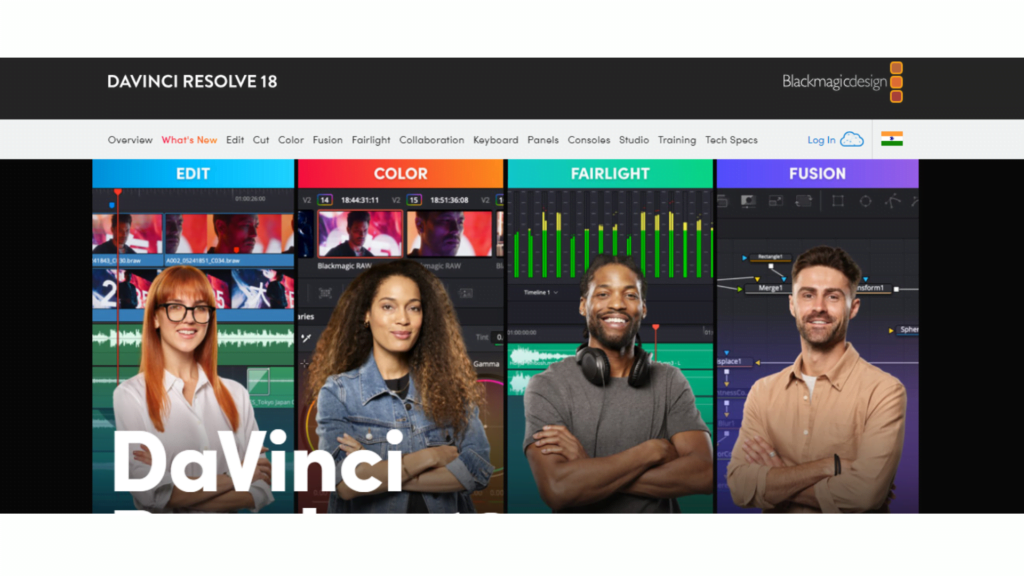
DaVinci Resolve is not just a video editing software; it’s a complete post-production studio. Renowned for its advanced color correction and grading tools, it offers an unparalleled level of control, making it the go-to choice for professionals in the film and television industry. Beyond color, its capabilities extend to audio post-production, visual effects, and motion graphics with the Fusion page, all integrated into one seamless environment.
Features of DaVinci Resolve
- Advanced Color Correction and Grading: DaVinci Resolve offers an unmatched color correction and grading toolkit, allowing for precise control over colors, making it the industry standard for colorists.
- Integrated Visual Effects: With the Fusion page, users have access to a powerful visual effects suite directly within the application, enabling complex effects and animation creation without the need for external software.
- Comprehensive Audio Post-Production: The Fairlight page in DaVinci Resolve provides a full-featured digital audio workstation (DAW) with mixing, editing, and mastering capabilities, all within the same software.
- Multi-User Collaboration: DaVinci Resolve supports real-time collaboration, allowing multiple users to work on the same project simultaneously, which is ideal for large teams and complex projects.
- Non-Linear Editing: It offers a robust non-linear editing platform that supports a wide range of formats, high frame rates, and resolutions up to 8K, catering to the needs of professional editors.
- Cross-Platform Compatibility: DaVinci Resolve is available on Windows, macOS, and Linux, offering flexibility and accessibility for users across different operating systems.
Pros of DaVinci Resolve
- Professional-Grade Tools: Offers a comprehensive suite of editing, color grading, audio post-production, and VFX tools that meet the demands of professional filmmakers and content creators.
- High-Quality Output: The software’s high processing capabilities ensure top-quality output, suitable for commercial and film production.
- Customization and Flexibility: DaVinci Resolve allows users to customize their workflow and interface, making it adaptable to various project types and user preferences.
- Free Version Available: There’s a very capable free version of DaVinci Resolve, making it accessible to beginners and professionals alike who are looking to explore its extensive features without initial investment.
Cons of DaVinci Resolve
- Steep Learning Curve: The extensive range of professional tools and features can be overwhelming for beginners, requiring a significant time investment to learn.
- Hardware Requirements: DaVinci Resolve demands high-performing hardware, especially for 4K and 8K video editing, which can be a barrier for users with less powerful computers.
- Complexity for Simple Projects: For users with basic video editing needs, DaVinci Resolve might be more complex and feature-rich than necessary, leading to a less efficient workflow.
Pricing
- Free Version: The free version is incredibly feature-rich and suitable for most individual creators and small studios. It includes the majority of the editing, color correction, VFX, and audio post-production tools.
- Studio Version: The Studio version of DaVinci Resolve is priced at $295. It unlocks additional features such as advanced noise reduction, HDR grading, 3D tools, and more. This one-time payment also includes future updates, making it a cost-effective choice for professionals seeking the most advanced capabilities of the software.
What is Flixier?

Flixier is a cloud-based video editing platform that emphasizes speed, simplicity, and collaboration. Accessible from any device with an internet connection, it caters to a wide range of users, from beginners to professionals.
With its intuitive drag-and-drop interface, real-time collaboration features, and fast rendering times, Flixier makes video editing accessible and efficient.
Users can take advantage of built-in stock media, direct publishing to various platforms, and the ability to work on projects from anywhere, without the need for powerful hardware. Flixier is suited for those seeking a flexible, user-friendly solution for rapid video creation and sharing.
Flixier Features:
- Cloud-Based Platform: Enables editing from any device with a web browser, offering unparalleled accessibility and convenience without the need for powerful hardware.
- Real-Time Collaboration: Facilitates teamwork by allowing multiple users to work on the same project simultaneously from different locations, enhancing productivity.
- Drag-and-Drop Interface: Intuitive design makes it easy for users of all skill levels to start editing videos without a steep learning curve.
- Fast Rendering: Utilizes cloud processing for fast video export, significantly reducing the time it takes to render and share your final product.
- Integrated Stock Media: Provides direct access to millions of stock videos, images, and music tracks, simplifying the process of finding and incorporating high-quality media into projects.
- Cross-Platform Compatibility: Works seamlessly across Windows, macOS, Linux, and Chromebooks, ensuring that users can edit and collaborate regardless of their operating system.
Pros of Flixier:
- No need for powerful hardware, as it runs in the cloud.
- Enables real-time collaboration, making it ideal for team projects.
- User-friendly interface suitable for beginners and professionals alike.
Cons of Flixier:
- Dependent on internet connection quality due to its cloud-based nature.
- While fast and efficient, it may lack some of the advanced features found in desktop software like Final Cut Pro.
- Subscription-based pricing can become costly over time for continuous use.
Flixier Pricing:
- Free Plan: Ideal for basic editing needs with 2 GB cloud storage, up to 10-minute video length, and 720p export resolution. Includes Flixier branding on exports.
- Creator Plan: For individual creators at $14/month (annual) or $19/month (monthly), offering 10 GB storage, unlimited video length, 1080p exports, and no branding.
- Pro Plan: Targeted at professionals and small teams, priced at $29/month (annual) or $39/month (monthly), with 30 GB storage, unlimited length, 4K exports, and collaboration features.
- Business Plan: Custom-priced for larger teams, providing 100 GB+ storage, unlimited length, 4K exports, advanced collaboration, and priority support.
- Educational/Non-Profit Discounts: Special pricing for educational institutions and non-profit organizations.
Head-to-Head Comparison Between DaVinci Resolve Vs Flixier
1. Performance and Hardware Requirements:
- DaVinci Resolve demands high-performance hardware for smooth operation, especially for 4K and 8K editing.
- Flixier operates in the cloud, minimizing the need for powerful local hardware and offering accessibility from any device with an internet connection.
2. Editing Features and Capabilities:
- DaVinci Resolve offers a comprehensive suite of professional-grade video editing tools, including advanced color correction, audio post-production, and visual effects.
- Flixier provides an intuitive editing experience with a focus on speed and efficiency, catering well to quick turnaround projects and collaborative editing.
3. Learning Curve:
- DaVinci Resolve has a steep learning curve due to its extensive professional features, requiring time and effort to master.
- Flixier is designed to be user-friendly, with an intuitive interface that allows for quick adoption by beginners and intermediate users.
4. Pricing and Accessibility:
- DaVinci Resolve offers a powerful free version with nearly all features included, while its Studio version requires a one-time payment for advanced features.
- Flixier uses a subscription-based model, with various tiers to suit different user needs, from free basic access to advanced business plans.
5. Collaboration:
- DaVinci Resolve supports multi-user collaboration within its Studio version, suitable for large teams working on complex projects.
- Flixier emphasizes real-time collaboration and cloud-based project sharing, making it ideal for distributed teams and remote workflows.
6. Output Quality and Export Options:
- DaVinci Resolve is known for its high-quality output, supporting up to 8K resolution and a wide range of formats for professional use.
- Flixier offers efficient export options up to 4K resolution, focusing on speed and convenience for social media, web content, and quick distributions.
Choosing between DaVinci Resolve and Flixier
Choose DaVinci Resolve if:
- You need professional-grade editing tools: If your projects demand high-end color grading, audio post-production, and visual effects, DaVinci Resolve offers an industry-leading suite of tools.
- You work on complex projects: For filmmakers, commercial video producers, and anyone working with high-resolution footage or complex editing timelines, Resolve’s robust feature set is invaluable.
- You have access to powerful hardware: Since Resolve is resource-intensive, especially for 4K and 8K projects, it’s ideal if you have or are willing to invest in a high-performance computer.
- You’re willing to invest time in learning: If you’re committed to mastering a professional video editing software, Resolve offers extensive resources and a strong community for learners.
Choose Flixier if:
- You prioritize speed and efficiency: For content creators who need to produce videos quickly, especially for social media or online platforms, Flixier’s cloud-based editing speeds up the production process.
- You require flexibility and accessibility: If you need to edit videos on different devices or collaborate with team members remotely, Flixier’s cloud platform provides the necessary flexibility.
- You’re looking for ease of use: Flixier’s intuitive interface and straightforward editing tools make it suitable for beginners or anyone looking to avoid a steep learning curve.
- Collaboration is key to your workflow: With real-time collaboration features, Flixier is ideal for teams needing to work together seamlessly, regardless of location.
FAQs
1. Can DaVinci Resolve handle projects with high-resolution footage?
Yes, DaVinci Resolve is built to manage high-resolution footage and complex projects efficiently, but it requires a powerful computer to do so.
2. Is Flixier suitable for professional video editing?
While Flixier may not offer the depth of professional tools found in DaVinci Resolve, it is perfectly suited for many professional applications, especially where collaboration and speed are valued.
3. Do I need to install any software to use Flixier?
No, Flixier is cloud-based and requires only a web browser and an internet connection, making it highly accessible from anywhere.
4. How steep is the learning curve for DaVinci Resolve?
DaVinci Resolve has a steep learning curve due to its comprehensive suite of professional tools. However, abundant resources and tutorials are available to ease the learning process.
5. Can I switch from DaVinci Resolve to Flixier, or vice versa, without losing my work?
Direct project transfer might not be seamless due to the differences in features and capabilities. However, exporting and importing project files or video clips can facilitate moving between the platforms to some extent.
Conclusion
For high-end production work that requires the finest detail in color grading, audio editing, and visual effects, DaVinci Resolve is the clear choice, provided you have the hardware and time to support its use. It’s a professional’s tool for creating broadcast or cinema-quality videos.
On the other hand, if your focus is on producing content quickly, especially for online platforms where speed is of the essence, and collaboration is a regular part of your workflow, Flixier offers the simplicity, speed, and collaborative tools you need without a heavy investment in hardware.
Ultimately, the best choice depends on balancing your project requirements, team setup, and available resources. Both DaVinci Resolve and Flixier excel in their respective domains, so selecting the one that aligns with your creative goals and workflow will ensure you have the right tool to bring your visions to life.

Srishti Gaur is an accomplished SEO Associate with a strong background in content creation and software technology. With a knack for crafting strategies that drive traffic and improve search rankings, she combines her expertise in SEO with a deep understanding of tech tools and platforms. Passionate about bridging the gap between technology and impactful content, Srishti helps businesses grow their online presence and achieve measurable results.