In a world where video dominates the digital content landscape, finding the right tool to streamline video production is crucial. Enter Synthesia—an AI-powered platform that is revolutionizing how businesses, marketers, and educators produce professional-looking videos without the need for expensive equipment, actors, or video editing skills. With its innovative use of AI avatars and text-to-speech technology, Synthesia is positioned as a game-changer for video creators.
But is it the right tool for you? In this detailed review, we’ll explore the platform’s core features, benefits, drawbacks, pricing, and suitability for different types of users. By the end of this review, you’ll have a comprehensive understanding of what Synthesia offers in 2024 and whether it meets your video creation needs.
Table of Contents
What is Synthesia?
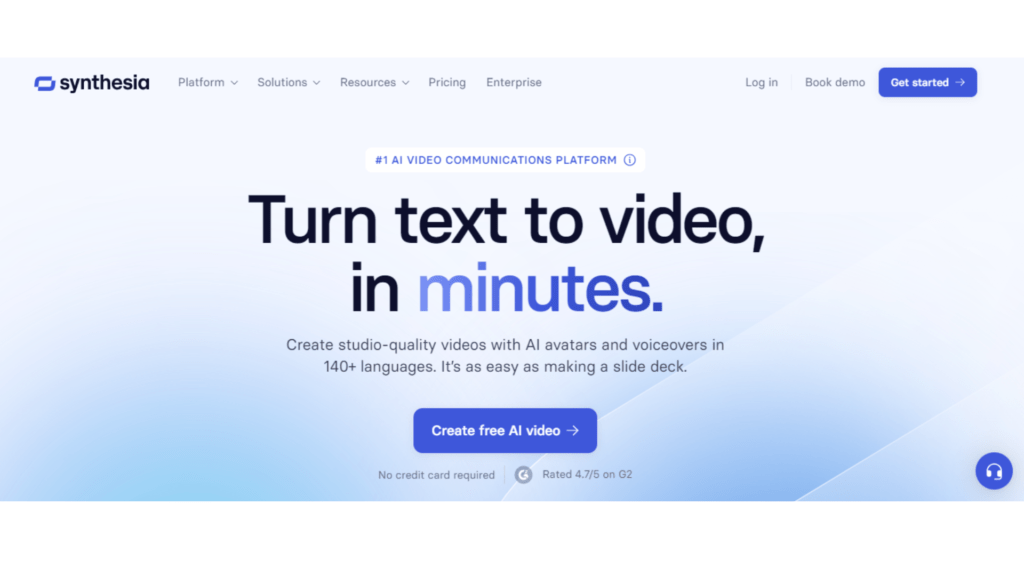
At its core, Synthesia is an AI video generation platform that allows users to create videos by leveraging AI avatars and voice-over technology. Whether you need corporate training videos, marketing content, or educational material, Synthesia enables you to produce high-quality video content with minimal resources. The platform’s strength lies in its simplicity and scalability—it’s designed to handle video creation at scale without sacrificing quality or brand consistency.
Unlike traditional video production methods that require a studio setup, actors, and professional editing, Synthesia lets users create videos by simply inputting text and selecting from a range of pre-designed AI avatars. These avatars are capable of delivering your message in over 120 languages, making Synthesia an attractive option for global businesses and educators.
Key Features of Synthesia
1. AI Avatars
The most distinguishing feature of Synthesia is its AI avatars. These avatars are pre-designed, virtual characters that can read scripts in a natural and human-like manner. The platform offers a library of more than 100 avatars to choose from, catering to a wide variety of use cases, including corporate presentations, marketing pitches, and educational content.
While the avatars are highly realistic and well-designed, customization options such as altering facial expressions, gestures, or appearance are somewhat limited, but more updates are expected in future iterations. However, for many users, the level of realism and professional look of these avatars is sufficient for their video needs.
2. Multilingual Support
One of the standout features of Synthesia is its extensive multilingual support. With over 120 languages and dialects supported, Synthesia enables you to create video content for audiences across the globe. This makes it an excellent choice for multinational corporations, online educators, and content creators looking to expand their reach.
The platform not only supports multiple languages but also offers different accents within each language. For instance, you can choose between American, British, or Australian English. This ensures that the avatar’s speech matches your target audience’s tone and preferences.
3. Text-to-Speech Technology
Synthesia’s text-to-speech technology allows users to type in a script, which the AI avatars then read aloud. The quality of the voice output is quite impressive, with a natural-sounding tone and intonation that can be further adjusted for pace, pitch, and emphasis. This feature eliminates the need for voice actors, making the production process even more efficient.
However, while the text-to-speech capabilities are advanced, the voices can sometimes sound slightly robotic, especially when dealing with longer, more nuanced scripts. Fine-tuning the delivery to match emotional cues is still a work in progress.
4. User-Friendly Interface
Synthesia’s interface is designed to be incredibly user-friendly, making it accessible even for those with little to no experience in video production. The drag-and-drop interface allows users to add elements like text, images, and animations to videos with ease. You can upload a script, choose an avatar, select a background, and generate a video in minutes.
For businesses or agencies that require a high volume of video content, Synthesia’s simplicity can significantly reduce production time, while still delivering polished, professional results.
5. Custom Branding and Templates
Synthesia offers a range of branding and customization options to ensure that videos remain aligned with a company’s visual identity. Users can upload their logos, use brand colors, and select custom fonts to ensure consistency across all video content.
The platform also includes a variety of pre-built templates designed for different industries and purposes. Whether you need a product demo, onboarding video, or explainer video, you can pick a template, customize it, and create a professional-looking video in no time.
6. Collaboration and Sharing Tools
Synthesia supports team collaboration, allowing multiple users to work on a single project. This feature is particularly useful for marketing agencies, content creation teams, and businesses with distributed teams. You can assign different roles to team members and collaborate on video creation in real-time.
Once the video is ready, Synthesia provides multiple options for sharing and distribution. Videos can be exported in various formats and shared via email, embedded in websites, or uploaded directly to social media platforms like YouTube and LinkedIn.
7. API and Integrations
For businesses looking to scale their video production or integrate video content into their existing workflows, Synthesia offers API access. The API allows developers to automate video creation and integrate Synthesia’s capabilities into websites, apps, or other tools. This makes Synthesia not just a video creation tool, but also a flexible component of a broader content strategy.
Pros and Cons of Synthesia
| Pros of Synthesia✅ | Cons of Synthesia❌ |
| Time and Cost-Efficient: Creating videos with Synthesia is faster and more affordable compared to traditional production. | Limited Customization for AI Avatars: Customization options like adjusting facial expressions or gestures are limited. |
| Multilingual Capabilities: Supports over 120 languages, making it ideal for global content distribution. | Not Ideal for Complex Videos: Best suited for simple videos like presentations or tutorials, not for complex tasks. |
| No Technical Expertise Required: User-friendly interface enables even those with no video editing skills to create videos. | Dependence on AI: Text-to-speech can sound robotic at times, lacking the human touch for emotionally-driven content. |
| Brand Consistency: Offers customizable branding options, ensuring all videos stay aligned with your company’s identity. | Cost for High-Volume Users: Pricing can add up for businesses needing a large volume of video content. |
| Regular Updates: Synthesia frequently adds new features, avatars, and improvements, making it a forward-thinking tool. |
Pricing of Synthesia
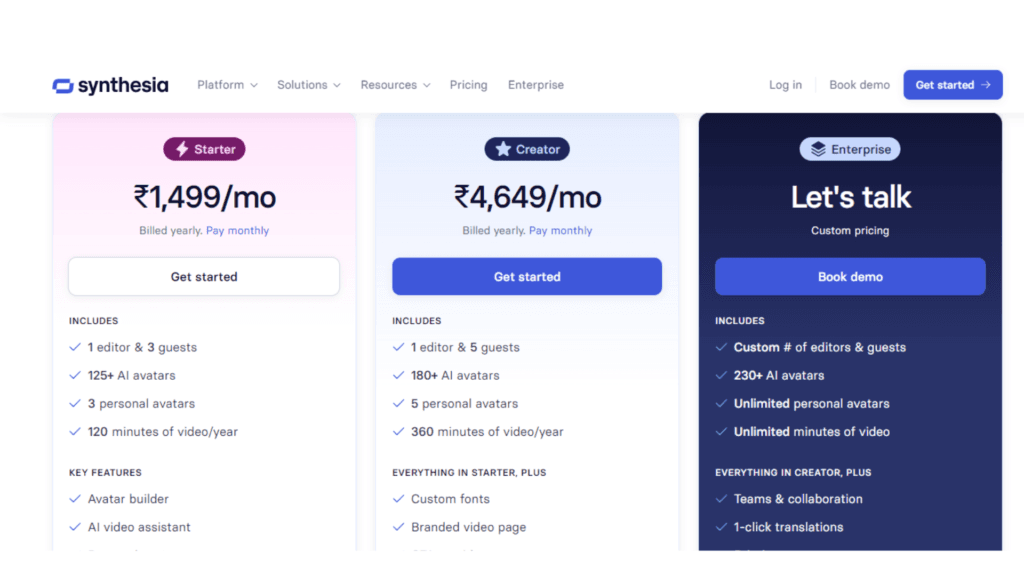
Synthesia offers a subscription-based pricing model, with the basic plan starting at $30 per month. This plan provides access to most of the platform’s features, including AI avatars, templates, and multilingual support.
For larger enterprises or users needing API access and advanced customization options, Synthesia offers custom pricing based on usage. While the cost can add up for high-volume users, the platform’s time and cost savings often outweigh the subscription fees.
| Pricing Plan | Features Included | Cost |
| Personal Plan | Access to most core features, including AI avatars, multilingual support, and video templates. Suitable for individual users or small projects. | $30 per month |
| Custom Enterprise Plan | API access, advanced branding, and customization options. Ideal for businesses with high-volume video production needs. Custom pricing based on requirements. | Custom Pricing |
Who Should Use Synthesia?
Synthesia is a versatile tool that can benefit a variety of users, including:
- Businesses and Corporations: For companies needing to produce training videos, product demos, or corporate presentations, Synthesia offers a quick and cost-effective solution.
- Marketers and Content Creators: Synthesia’s AI avatars and customizable templates make it easy to create engaging marketing content without the hassle of traditional video production.
- Educators: Teachers and educational institutions can use Synthesia to create explainer videos and lessons in multiple languages, making it easier to reach a global audience.
- Human Resources and Internal Communications: Synthesia is also a valuable tool for HR departments, allowing them to create onboarding materials, internal communications, and training videos efficiently.
Final Verdict
Synthesia has positioned itself as a revolutionary tool in the world of video production. By leveraging AI to streamline the video creation process, the platform offers significant time and cost savings while maintaining a high level of professionalism.
Though it has its limitations—particularly in avatar customization and emotional delivery—it’s hard to ignore the impact Synthesia is making. For businesses, educators, and content creators looking to produce high-quality video content without the hassle of traditional production methods, Synthesia is a tool worth considering in 2024.
FAQs
1. What types of videos can I create with Synthesia?
You can create a wide range of videos, including corporate presentations, product demos, training videos, explainer videos, and more.
2. Does Synthesia support multiple languages?
Yes, Synthesia supports over 120 languages and dialects, making it ideal for global content creation.
3. Can I customize Synthesia avatars?
While Synthesia offers a variety of avatars, customization options are somewhat limited. You can choose different avatars, but detailed modifications like facial expressions and gestures are still not available.
4. How much does Synthesia cost?
Pricing starts at $30 per month, but custom pricing is available for enterprises and high-volume users.
5. Do I need video editing experience to use Synthesia?
No, Synthesia is designed to be user-friendly, and no prior video editing experience is required to create professional-looking videos.

Srishti Gaur is an accomplished SEO Associate with a strong background in content creation and software technology. With a knack for crafting strategies that drive traffic and improve search rankings, she combines her expertise in SEO with a deep understanding of tech tools and platforms. Passionate about bridging the gap between technology and impactful content, Srishti helps businesses grow their online presence and achieve measurable results.